

Open source · Kubernetes native
self-hosted coding agents for Kubernetes teams
Run, steer, and audit agent work in your own infrastructure. Connect engineering tools and your preferred model providers to one observable execution platform.

Sheet01b — Desktop
TitleRun view — chat, steering, subagent graph
Drawn byyour agents
Sheet01c — iPad
TitleThe same run, followed live from your iPad
Statuscompute stays in your cluster

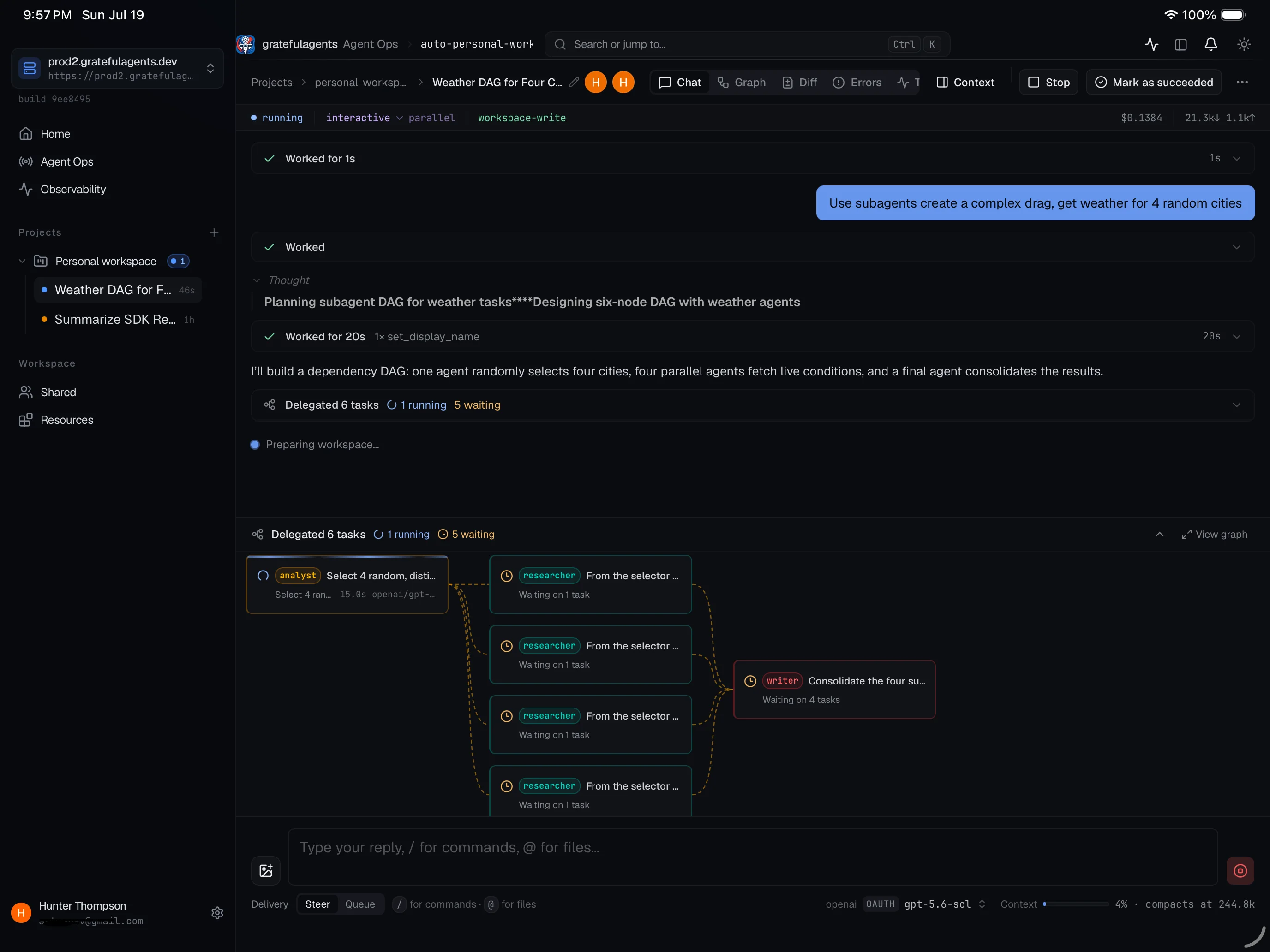
Sheet01d — iPad
TitleSix delegated tasks, steered from anywhere
Statuscompute stays in your cluster


Sheet 08 · Principles
Why run coding agents in your own cluster?
Cloud agent harnesses are convenient, but they come with trade-offs that matter the moment your codebase has proprietary logic, private registries, or compliance requirements. Here is the case for keeping the compute yours.
Source code and prompts stay inside your network
When an agent runs in a cloud SaaS harness, your repository content, file diffs, and the natural-language prompts you write all travel to a third-party data center. With GratefulAgents, every agent run executes inside a sandbox in your own Kubernetes cluster. The only outbound connections are the inference requests your agents make directly to the model provider whose API key you supply — and those requests go straight from your cluster to Anthropic, OpenAI, or whoever you choose.
You own the model credentials — and the costs that come with them
GratefulAgents stores all credentials in your workspace. There is no credential relay through our servers. This also means you can use provider-negotiated pricing, API credits, or committed-spend agreements you have directly with Anthropic or OpenAI. You are not locked into a harness vendor's margin on top of the underlying inference cost.
The harness itself is inspectable and auditable
GratefulAgents is open source under AGPL-3.0. You can read every line of the controller, the CRD logic, and the sandbox configuration. Combined with the per-run observability console — which records every tool call, every LLM request, and every token — you always know what the agent did and why. A black-box harness cannot offer that. See how this differs from cloud coding agents.
Agent compute sits next to your private infrastructure
Agents frequently need to read internal packages, query private databases, or call APIs that are not reachable from the public internet. When the agent sandbox runs inside the same cluster (or the same VPC) as those resources, latency is low and no ingress rules or tunnels are required.
You apply the same Kubernetes network policies, RBAC, and pod security standards you already use for the rest of your workloads. For on-premise or air-gapped environments, this is the only viable option. See the full case for self-hosted coding agents.
Devin and GitHub Copilot's coding agent are cloud services: the checkout, the agent process, and the model credentials live on the vendor's infrastructure. GratefulAgents is the self-hosted alternative — all three stay inside your cluster.
Get started with the Kind local demo (macOS or Linux laptop, about fifteen minutes) or the k3s server install for a persistent deployment.
Sheet 09 · Field notes
Frequently asked questions
Is GratefulAgents really self-hosted?
Yes. The Kubernetes controller, dashboard, and all agent run sandboxes execute entirely inside your own cluster. Nothing phones home to a GratefulAgents cloud. Your source code, prompts, and model responses travel between your cluster and the model provider of your choice — never through our infrastructure.
Do I need Kubernetes experience to get started?
You need a working cluster, but not deep expertise. The fastest path is the Kind guide: one script spins up a local cluster on a macOS or Linux laptop in about fifteen minutes. For a persistent server install, the k3s guide walks through a fresh Debian or Ubuntu machine end to end. Both guides cover every prerequisite.
Which AI models can I use?
Any provider whose credentials you store in your workspace: Claude (Anthropic), OpenAI, OpenRouter (which surfaces many hosted models), Grok (xAI), and GitHub Copilot. Credentials are saved in your workspace and leave your cluster only when an agent makes an inference request directly to that provider's API.
How is this different from GitHub Copilot's coding agent?
Copilot's coding agent is a cloud SaaS feature. Your code and prompts are processed on GitHub's infrastructure, and you cannot inspect the execution harness. GratefulAgents runs entirely in your cluster — you own the sandbox, the model credentials, the traces, and the execution logs. You can also trigger work from Linear, Slack, or cron, not just GitHub issues.
Can agents open pull requests and interact with GitHub?
Yes. Agents run with your configured GitHub credentials and can read issues, create branches, commit, open pull requests, and post review comments — the same actions a developer would take. You can also trigger runs automatically when a GitHub issue or PR comment matches a pattern and have the agent respond or open a PR directly.
What does GratefulAgents cost?
The software is free and open source under the AGPL-3.0 license. You pay only for the model-provider API calls your agents make — charged directly by Anthropic, OpenAI, or whichever provider you configure — and for the compute running your Kubernetes cluster. There is no GratefulAgents subscription or per-seat fee.
Is it ready for production use?
GratefulAgents is in active early development. It works for evaluation, prototyping, and internal team use, but you should expect bugs and breaking changes between releases. High availability, managed hosting, and a production support SLA are not documented. We recommend starting with the Kind local demo before committing to a persistent server deployment.
Index of sheets · the field manual
Go from first run to full control.
The docs ship from the same repository as the platform. Read them here; improve them on GitHub.
Start
Getting started
Deploy, secure, sign in, and connect a workspace.
→ RunAgent runs
Start work, steer mid-flight, change modes, and review traces.
→ AutomateProjects & schedules
Save run defaults per repository and launch on a schedule.
→ ConnectIntegrations
Create and steer runs from GitHub, Linear, and Slack.
→ ControlResources
Skills, MCP servers, runtime profiles, policies, modes, and roles.
→ ConfigureSettings
Credentials, model preferences, and Git identity.
→ ShareCollaboration
Give teammates the right access to projects and runs.
→ RecoverTroubleshooting
Resolve credential, integration, and workspace problems.
→Issued for construction
Your agents.
Your compute.
Own the runtime, choose the models, and see the work. Start with the local Kind demo.
Sheet10 — closeout
ProjectGratefulAgents
LicenseAGPL-3.0
Runtimeyour cluster
ClientsWeb · Desktop · iOS · Android
Drawn byyour agents